Thursday, 15 June 2023

Vision Pro: Apple’s breakthrough AR headset, and why it is a big deal


“It’s the first Apple product you look through and not at,” Apple CEO Tim Cook said, describing Apple's first major new product category in eight years.
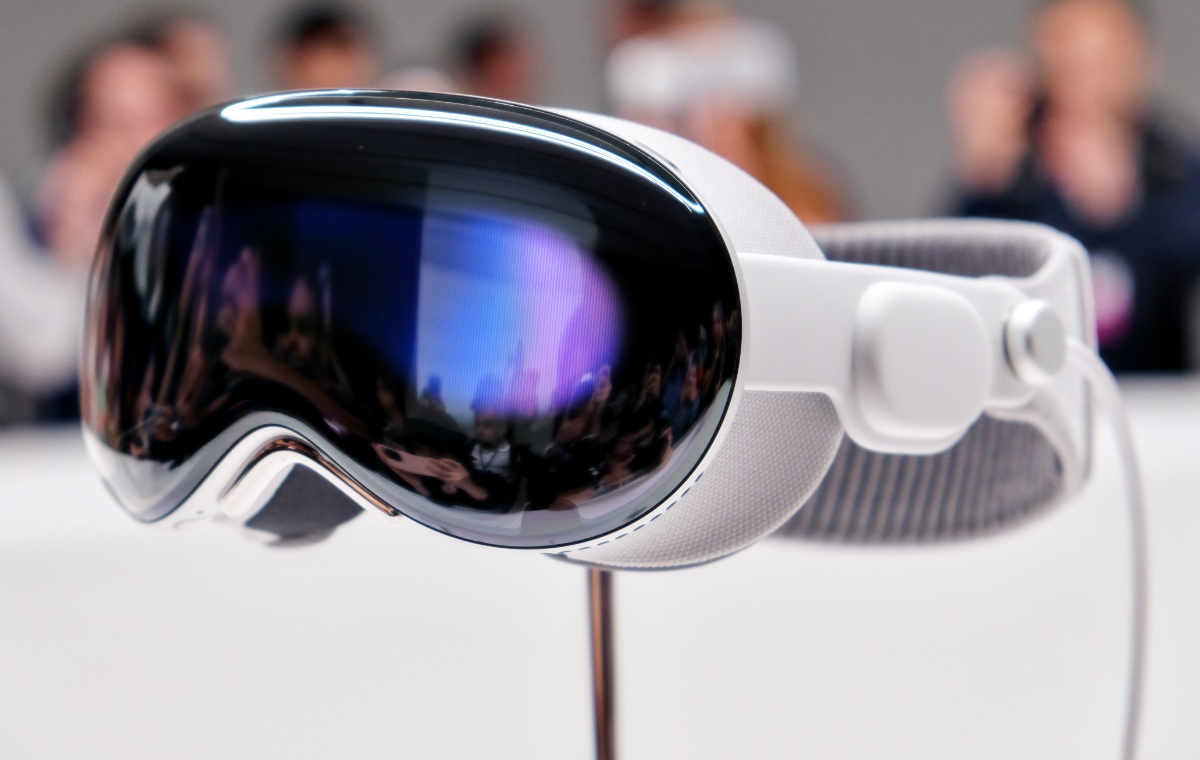


Apple has unveiled the Vision Pro, a mixed reality headset that allows “spatial computing” by using the wearer’s eyes, voice and hands. The headset is the biggest breakthrough product from Apple since the launch of the iPhone more than 15 years ago, and could mark the next chapter in personal technology.

What is Vision Pro?

Apple’s first major new product category in eight years, the Vision Pro is a headset that the wearer can control with her eyes, hands, and voice, a feature that other headsets do not have. “It’s the first Apple product you look through and not at,” CEO Tim Cook said. Vision Pro represents “spatial computing”, and brings “a new dimension to powerful personal technology”, he said.

The headset features a glass 23 million-pixel screen that covers the upper part of the user’s face like a pair of oversized ski goggles. The facial interface is adjustable, which means it should provide a closer and more comfortable fit than competing headsets.

The headset is encased in “aerospace grade alloys”, glass, and fabric, and contains five sensors, 12 cameras, a 4K display for each eye, and a wearable computer that is cooled by a fan.

What can it do?

Vision Pro is essentially an augmented-reality (AR) headset that “seamlessly” blends the real and digital worlds. The device can switch between augmented and full virtual reality (VR) using a dial. However, Apple did not use the expressions “mixed reality” or “virtual reality” in the presentation.

According to Apple, the Vision Pro allows users to consume and create content in a new way, in the spaces around them. They can watch movies in 3D, with spatial audio as though they were in a cinema theatre, look at pictures or video, and play video games.

Vision Pro uses a custom software called visionOS which, according to Apple, is “the first OS designed for the ground up for spatial computing”. Architecturally, visionOS is similar to macOS and iOS, but it adds an additional “real-time subsystem” for processing interactive visuals.

There will be a dedicated App Store for Vision Pro. The apps will be tuned for the 3D interface, and will use the headset’s eye tracking and optic ID, allowing the user to use Apple Pay and autofill passwords. Apple has said no user data will be shared without permission.

IF YOU WEAR GLASSES, you can still use Vision Pro. Apple has teamed with Zeiss to create custom optical inserts that magnetically attach to the lenses for those who wear glasses. But how this actually works will be clear only after enough people with specs start using the headset around the world.

IT IS NOT FOR CHILDREN. Apple has recommended the user is at least 13 years old.

ITS RUGGEDNESS IS NOT KNOWN. Apple has also not said if the headset has received any water resistance rating.

BATTERY DOESN’T LAST LONG. Vision Pro requires an external battery pack that you need to charge after about 2 hours of use. The separate battery suggests Apple wanted to keep the headset as light as possible. Meta’s Quest Pro headset includes the battery that makes it bulky.

IT IS EXPENSIVE. Vision Pro is priced at $3,499, or about Rs 2,90,000 at the current exchange rate. The Quest Pro mixed reality headset costs only $,1000 (Rs 83,000).

website Visit : https://computerapp.sfconferences.com/

Wednesday, 14 June 2023

Windows 11 introduces app privacy settings and easy-to-use VPN: Know more


Windows 11's recent update brings a range of new features, including account badging, live captions for calls, a convenient glanceable VPN icon, and an enhanced widget panel.


Microsoft has recently unveiled a range of new security features for its latest operating system, Windows 11. These enhancements aim to provide users with increased privacy control and protection against potential threats. One notable addition is the introduction of new app privacy settings, which grant users transparency and control over their personal information.

Another noteworthy feature is the glanceable VPN (Virtual Private Network). When users establish a recognized VPN connection, a small shield icon appears on the taskbar, indicating a secure connection. This visual cue allows users to quickly verify their VPN status.

Furthermore, Microsoft has included customization options for the VPN feature via Quick Settings. This empowers users to align the VPN settings according to their personal preferences and requirements.

The company said that Windows 11 PCs are equipped with the advanced Pluton security processor that offers enhanced protection from chip to cloud. This integration ensures robust defense against malware, hardware attacks, and credential compromise.

In addition to these security updates, the company has introduced an account badging feature. Beginning in June, users will receive real-time alerts on their Start menu, prompting immediate action to protect their information and PC.

Moreover, the tech giant is also rolling out a new feature to Word that enables users to react to comments, similar to the reactions feature in Outlook. The company is including a Like button in Word, making it easier for users to respond to comments within documents.

To react to a comment in Word, users simply need to open a document, navigate to the comment section, and click the 'Like' button located in the top right corner. This feature is currently available for web users and Beta Channel users

Monday, 12 June 2023

Computer Graphics


What is computer graphics?


Computer graphics refers to a technology that generates images on a computer screen. It’s used in digital photography, film and television, video games, and on electronic devices and is responsible for displaying images effectively to users. Think of computer graphics as the intersection of design and computer science, with the purpose of delighting and engaging audiences.

You can find examples of computer graphics in action all around you. Some examples include blockbuster films, such as the 2009 film Avatar, which depicts the Na’vi species using facial motion capture technologies, images and icons you see on your smartphone when you open mobile applications, and data presentations like charts and graphs you might come across in your line of work.


Types of computer graphics

Raster graphics

A raster graphic is essentially a 2D image composed of rows and columns of square pixels. Each pixel contains information about color and hue. When combined, pixels form a coherent image. The more pixels per inch the more high-resolution an image. A high-resolution raster graphic will appear sharper and more true-to-life than one with low resolution.
 
Vector graphics

A vector graphic is made up of shapes and lines. Mathematical formulas determine how the shapes and lines relate to each other, so that you can scale vector graphics larger or smaller in size without distorting the shape or resolution.

CGI, or computer-generated imagery, turns 2D vector graphics into 3D representations and converts them into raster images. CGI is used in TV, film, or video games to depict characters, scenes, and special effects.

Interactive computer graphics

Interactive computer graphics allow a user to tell a computer how to generate an image. Here’s a sampling of what you can do in interactive computer graphics:

Add automatic zooming on an interactive scrolling interface to improve scan of a 2D information space.

Add automatic adjustments to digital sketch programs to easily record ideas in 2D using digital ink.

Add a dragging feature to clothing animations to improve the experience of adding clothes to 3D characters.

Use motion files from a 3D animation database to generate moving characters from stick figure drawings.

Design indoor lighting using a painting interface to control a robotic lighting system.


Non-interactive computer graphics

In contrast to interactive computer graphics, non-interactive computer graphics do not allow users to determine how images are generated. Examples of non-interactive computer graphics include images for a website or mobile application and 3D animation and CGI in film.
 
Computer graphics software

Using computer graphics software can bring a world of possibilities within reach and allow you to explore your creative and technical potential. In the table below, we cover the cost and features of five software programs, as well as how users rate each program on G2, a site for discovering and reviewing software. G2 ratings for these software programs reflect users’ perceptions of the ease of use and quality of support

Computer graphics jobs

If you’re thinking about pursuing a career in computer graphics, it’s helpful to know what kinds of jobs may be available to you. Below, we list some job titles you may come across in your research and include average total US salary figures from Glassdoor as of January 2023, and responsibilities and typical job requirements from Zippia and ZipRecruiter.

Use this list as a basis for further research and choosing the path that aligns with your long-term goals.
 
Computer graphics designer

What they make: $59,518

What they do: design graphics for interactive websites; create visuals for print or digital use; use graphics software to satisfy stakeholders’ needs

Qualifications they need: knowledge of graphics software; graphic design and computer graphics skills; associate or bachelor’s degree in graphic design, computer science, or computer applications
 
Digital artist

What they make: $54,344

What they do: use computer software to create digital art and design graphic images; work with illustrations, photography, and text

Qualifications they need: bachelor’s degree in visual or commercial art, graphic design, or related field; knowledge of graphics software; artistic talent

Web developer

What they make: $82,534

What they do: design and maintain websites; test out new code; test web modules; optimize user-interface designs; provide technical support to project stakeholders

Qualifications they need: bachelor’s or master’s degree in computer science, IT, or computer engineering; knowledge of JavaScript, HTML, and CSS; UX/UI skills; front-end development skills

Animator

What they make: $58,059

What they do: sketch scenes; create storyboards; animate characters, props, and scenery; collaborate with other creatives to animate films and games

Qualifications they need: skills in animation, motion capture, storyboards, motion graphics; experience using animation software; associate or bachelor’s degree in animation, graphic design, fine arts, or computer science


Game artist

What they make: $59,935

What they do: create art and visual elements for video games; use software to build characters, objects, textures, clothing, etc.; collaborate with teams and stakeholders to complete projects

Qualifications they need: associate or bachelor’s degree in graphic design, animation, or fine arts; skills in animation and sketching; skills using Maya; UI skills


Graphic engineer

What they make: $82,204

What they do: create integrated graphics and visual effects systems for software applications; collaborate with artists and graphic designers to create motion graphics and visuals

Qualifications they need: skills in C++, OpenGL, Unity, and other technologies; animation skills; associate’s or bachelor’s degree in graphic design, computer science, or drafting and design

Sunday, 11 June 2023

WhatsApp introduces new interface for group settings screen on iOS


The updated group settings screen comes with a new feature called 'Add Other Participants.' This option allows group admins to have control over who can add new members to the group.

WhatsApp, the instant messaging platform owned by Meta, is reportedly rolling out a new interface for the group settings screen on iOS. According to WABetaInfo, users who are group administrators and have the stable version of WhatsApp installed can now experiment with the redesigned group settings screen after updating the app.


The updated group settings screen comes with a new feature called 'Add Other Participants.' This option allows group administrators to have control over who can add new members to the group. With this feature, administrators can choose to limit the ability to add new members to specific individuals or restrict it entirely.

While this new interface and feature are currently available to iOS users who have updated to the latest version of WhatsApp from the App Store, the report suggests that it may gradually roll out to other users over the coming weeks.


In addition to these updates, WhatsApp has also introduced a new feature called "Channels" within the app. Channels provide a simple, reliable, and private way for users to receive important updates from people and organizations. These updates are separate from regular chats with family, friends, and communities.

Channels are located in a dedicated tab called "Updates," where users can find the status and channels they choose to follow. This new feature aims to streamline the experience by organizing important updates in one place, making it easier for users to stay informed without cluttering their regular conversations.

Channels serve as a one-way broadcast tool for admins to share text, photos, videos, stickers, and polls with their followers. By introducing the revamped group settings screen and the 'Add Other Participants' option, the company aims to offer group admins more flexibility in managing their groups effectively.

                                          Operating System It seems like you may have a typo in your question. I assume you're asking ab...